Guild attendance tracker for Albion Online
AlbionZVZ tracks attendance two ways: it checks your CTA signups against the battleboard to see who actually fought, and it shows any guild's players ranked by the battles they were in.
Two kinds of attendance
"Attendance" means two different things in Albion, and guilds usually need both.
- Who showed up to our CTA. You posted an event, people signed up, and afterwards you want to know who actually played, who bailed and who joined without signing up. That is event attendance.
- Who is in the fights. You want a guild's players ranked by how many battles they were in. That is battleboard attendance, and it comes from battle data rather than signups.
AlbionZVZ does both. Event attendance is checked against your own signups. Battleboard attendance works for any guild.
Event attendance: how it works
- Run the event and mark it finished. The roster you seated is the sheet everything is compared with.
- Open the Attendance step. It is one of the settlement steps on the finished event, next to loot split, regears and player split.
- Check the killboard. Re-check killboard loads the battles in the event's window for your linked in-game guild and compares them with the signups. You can run it again at any time. If your guild has no in-game link, the killboard cannot confirm anyone and you decide by hand.
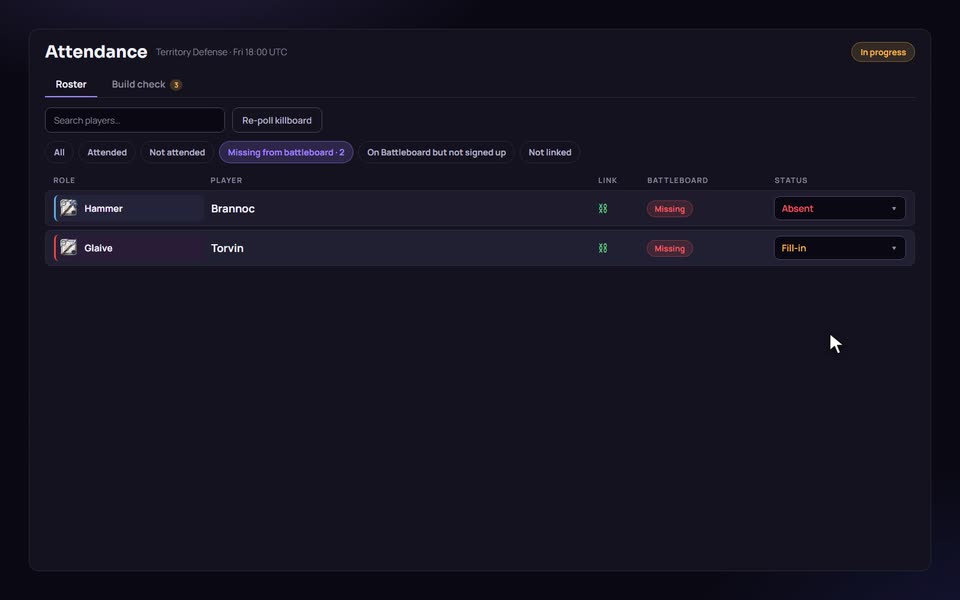
- Read the result. The list shows who attended, who did not, who is missing from the battleboard, who was on the battleboard but never signed up, and who has no linked character. Filters switch between these views.
- Fix what is wrong. Set a player's status, or use Add player for someone who fought without a signup.
- Mark the step done. Then continue to payout. Settling the event later freezes attendance.
Statuses and what the check will not do
Each signup has a status: Attended, Absent or Fill-in. Fill-in is for someone who played with the guild but was not on the signup sheet and was added after the fight.
The killboard check is deliberately cautious. It never marks anyone absent. A signup with no battleboard record is shown as missing, but stays attended until an officer decides, because a support who joined a fight and killed nobody and died to nobody leaves no trace on the battleboard. An officer's choice also survives later re-checks.
Matching uses the same logic as regears, so the attendance list and the payout always agree about who a battleboard player is: linked character id, then character name, and for signups with no linked character, the Discord display name. If a lot of players show as Not linked, ask members to link their Albion character on their profile.
Build check: who showed up in the wrong set
The Attendance step has a second tab, Build check. It compares the gear each attendee wore on the battleboard with the build they were seated on, and grades every player as right gear, minor, major, critical, or could not be graded. You can edit the rules that decide how strict it is.
Nothing runs on its own: an officer presses Run build check, reviews the flagged players one by one, and approves or removes each. Approve all minor clears small misses in one go, and Notify removed players sends a Discord message with the reason. Removing someone marks them Absent. One practical limit: the game's data service only keeps gear for about a week, so a check run on an old event may find no data for most players.
What attendance affects
- Payouts. Someone marked Absent is not paid. A fill-in who was added is.
- Guild statistics. Attendance feeds the analytics described below.
- Weapon mastery. Mastery levels are worked out from finished events and the final roster.
Analytics: attendance by member
In the guild's Analytics, the attendance tab ranks current members over a UTC date range. Pick Last 7, 14 or 30 days, or choose your own dates (up to a year, within your plan's history limit). For each member it shows:
- Events played. Distinct finished guild CTAs where the member was on the roster.
- % attendance. Events played as a share of all finished guild CTAs in the range.
- Daily attendance. The share of days in the range where the member joined at least a set number of events. The target is yours to set, and the default is one.
A threshold colors rows red below your number and green above it, so a glance shows who is slipping. You can search by name, filter by rank, filter by a percentage range, and copy the list of names, including Discord mentions, to post in a channel. Only current members are listed, and content events are not counted.
Battleboard attendance for any guild
Open a guild from the guild directory and its profile shows the guild's players with battles, kills, deaths, K/D, fame, fame per battle and last seen. Switch the window between 7, 30 and 90 days or all time, filter by fight size, and sort by any column. It is built from the same battle data as the battleboard, so it works for guilds that have never heard of AlbionZVZ.
Members see their own record
Each player has an Attendance page in their dashboard. It shows how many finished events they played across the guilds they belong to now, and the roles they were placed in.
Compared with other attendance tools
Tools that read only the public battle feed can tell you who was in a fight. They cannot tell you who was supposed to be there, because they do not have your signups. That is the reason to check both. A spreadsheet works for a small roster, but someone has to type every name, and nothing in it is tied to payouts.
The limits are worth knowing. The killboard check depends on members having linked their characters, and on the event window containing the fight. The battleboard side measures presence in battles, not whether someone was on the call.
Who it is for
Officers who hand out payouts and regears, leaders who need to know who is slipping, and members who want a record of the events they have played.
Frequently asked questions
Does the site decide who gets marked absent?
No. The killboard check can only confirm that someone was there. A player with no battleboard record is shown as Missing from battleboard and stays marked as attended until an officer changes them. That protects supports and healers who joined a fight and never killed or died.
How does it match battleboard players to signups?
By the Albion character linked to the member's account: first the character id, then the character name. For a signup with no linked character it falls back to comparing the Discord display name. Members who have not linked a character show under Not linked.
What happens to a no-show?
They are excluded from the event's payout. Officers set the Absent status on the Attendance step, and the choice stays until an officer changes it. A later killboard re-check does not overwrite an officer's decision.
Can I count someone who fought but never signed up?
Yes. Players who were on the battleboard under your guild tag but not on the signup sheet are listed under On Battleboard but not signed up. If their character is linked to a member, an officer can add them to the event with Add player.
Who can see attendance figures for my guild?
Guild analytics, including the attendance tab, is for officers and leaders by default, and a leader can grant the View guild analytics permission to other ranks. Members can see their own participation on their personal Attendance stats page.
Can I look up another guild's attendance?
Yes, from the battleboard side. Open a guild from the guild directory and its profile lists its players with battles, kills, deaths, K/D and fame over the last 7, 30 or 90 days, or all time. It counts public battle data, not signups.
Why do the attendance numbers on the analytics page change after I settle an event?
For events finished since 1 September 2026, corrections you make on the Attendance step are folded into guild statistics and weapon mastery when the event is settled. Payout eligibility reads your attendance choices straight away.