Killboard bot for Albion Online Discord servers
Add the AlbionZVZ bot to your Discord server, run /killboard-link, pick your in-game guild, and every battle it fights is posted to the channel you choose, with players, kills, deaths, fame and the opposing guilds. You do not need an AlbionZVZ account.
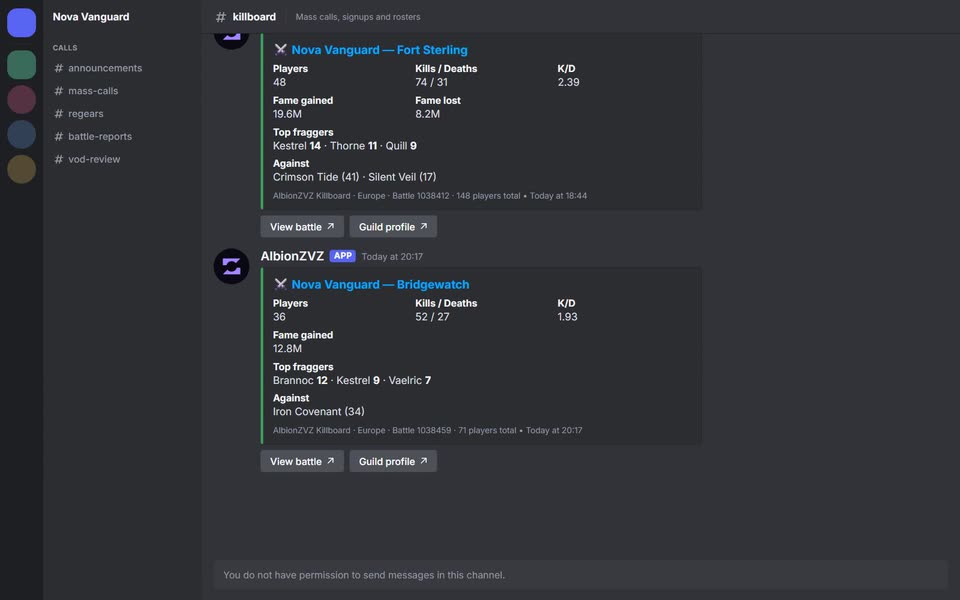
What it posts
The feed posts battle reports, not individual kills. When a battle that includes your guild appears in AlbionZVZ's data, the bot posts one message with:
- the guild name and the zone, in a colored embed (green when you got more kills than deaths, red when you got fewer);
- Players, Kills / Deaths and K/D for your guild in that fight;
- Fame gained and, when it is known, Fame lost;
- Top fraggers, your three players with the most kills;
- Against, the opposing guilds with how many players each brought;
- View battle and Guild profile buttons that open the full battle page and the guild's profile.
A second message follows with a link that unfurls into the battle card image, so the channel shows a picture as well as the numbers.
How it works
- Add the bot to your Discord server.
- Run
/killboard-linkin the channel where you want the posts. - Pick the guild from the autocomplete list.
- Optionally set a channel and
min_players. The channel defaults to the one you ran the command in. - Check the reply. The bot confirms the guild, the channel and the threshold privately, so the channel stays quiet.
To change the channel or threshold later, run /killboard-link again for the same guild. To stop a feed, run /killboard-unlink. If you only follow one guild you do not need to choose which one to remove.
Guilds that have an AlbionZVZ guild with a linked Discord server and in-game guild can also turn the feed on from the Integrations page by picking a channel, with an example of the post shown beside it.
What the links open
View battle opens the battle page. It has a players table where you can open a search list on Guild and Alliance, and a kills table with the same for Killer and Victim, and the region (EU, US or Asia) stays selected as you move around the battleboard. When a post covers several fights, View all fights opens one combined page for up to twelve battles. Guild profile opens the guild's page with its recent battles and players.
Fixing the usual problems
- "Pick your guild from the autocomplete list." The option must be chosen from the suggestions, because that is how the bot knows which region the guild is on.
- "I don't have any battles for that guild yet." Guilds appear once they have been in a fight big enough to reach the battle data.
- Feed limit reached. Remove one with
/killboard-unlinkbefore adding another. - Posts stopped. Check
/killboard-status. If the feed is paused, restore the bot's permission to post in that channel and run/killboard-linkagain for the guild. - Which channel types work. Regular text channels and announcement channels.
Details officers ask about
- No history dump. The bot only posts battles from the moment you link.
- Posted as soon as the battle shows up. Numbers are a snapshot of a fight that may still be running, so kills and deaths can still climb after the first post.
- Fame lost can be missing. The data behind it is not always available for a battle. When it is not known, the field is left out instead of showing a misleading zero.
- Only battles of 10 or more. The battleboard stores battles that reach 10 players on a guild, an alliance or overall. That is why solo and small-scale fights are not posted.
- Several guilds. A server can follow several guilds. By default there is a limit of five feeds per Discord server, and each feed has its own channel and threshold.
- No pings. Posts never mention anyone.
One post per fight night
Albion splits one continuous fight into several battles, so an hour of ZvZ could mean five separate posts. To avoid that, the bot folds battles from the same squad into one post. A later battle joins the open post when it starts within 30 minutes of the previous battle ending, when at least half of its players (and at least three) were already in the squad's earlier battles, and while the session is under 12 battles and 4 hours long. The bot then posts the combined version, titled with the number of fights and the time range, and removes the older message, so the current post is always the one at the bottom of the channel. Two different squads from the same guild stay separate.
If the database table that stores these sessions is not available, the bot falls back to one post per battle.
Compared with other killboard bots
A per-kill feed is the right tool if you want to watch every kill and see gear in real time. This feed does not do that: it posts one battle report per fight, with the numbers a guild leader quotes after a night. It cannot show individual kills or loadouts in the channel, but each post links to the battle page, where every kill is listed.
What is different is what sits behind the post. The same battle data feeds the public battleboard, guild profiles and, for guilds that use the whole platform, attendance, regears and event analytics.
Who it is for
Guild leaders, shotcallers and alliance Discords who want a running record of their fights in a channel without anyone copying links by hand.
Frequently asked questions
Do I need an AlbionZVZ account or guild to use it?
No. The killboard feed is standalone. Any Discord server can follow any in-game guild with /killboard-link. The command needs the Manage Server or Administrator permission, or officer rights if the server is linked to an AlbionZVZ guild.
How do I choose which guild to follow?
Start typing the in-game guild name in the guild option and pick it from the list. Each entry shows the region and how many battles AlbionZVZ has recorded for it, so guilds with the same name on different servers are easy to tell apart. Typing a name without picking from the list is rejected.
What does min_players do?
It is the smallest number of players your own guild must bring to a battle before the bot posts it. The default is 5 and you can set it from 1 to 500. It counts your guild's players only, not everyone in the fight, so it keeps small roaming groups out of a ZvZ channel.
Will it post old battles when I link it?
No. Only battles from the moment you link are posted. Nothing historical is dumped into the channel.
Why are some fights missing?
AlbionZVZ stores battles with at least 10 players on a guild, an alliance or in total. Smaller skirmishes and gank fights never enter the data, so they cannot be posted.
Does it ping anyone?
No. Killboard posts carry no mentions, so the channel does not become noise that people mute.
What if the feed stops posting?
Run /killboard-status in the server. It lists each feed, its channel, minimum players and when it last posted. After repeated failures, for example when the bot lost permission to post in the channel, a feed is paused and shown with the reason. Fix the permission and run /killboard-link for that guild again to resume it.