Siphoned Energy tracker for Albion Online guilds
Paste your guild's in-game Siphoned Energy account log into AlbionZVZ and every player gets a running tally of what they put in, what they took out and what they owe. Officers get an account check against the in-game total.
What it does
In Albion, your guild has a shared Siphoned Energy account. Members deposit energy into it and energy comes out, for example for crystal entry fees. The game keeps a log of each movement but gives you no running total per player.
AlbionZVZ fills that gap. An officer pastes the in-game log, the site works out what each player put in and took out, and each member can see their own standing. A negative number means the player owes the guild energy. A positive one means the guild is holding energy for them.
How it works
- Copy the log in game. Open the guild's Siphoned Energy account log and copy it. The format is tab-separated: Date, Player, Reason, Amount, newest first. Paste it exactly as the game gives it, without sorting it in a spreadsheet first.
- Open Import log. In the guild's Siphoned energy section, go to the Import log tab and paste into Account log.
- Enter the in-game total (optional). Type the number the guild account shows right now. It is the best way to catch missing lines.
- Press Preview import. Nothing is saved yet.
- Read the preview. It shows how many new lines will be counted, how many players are affected, how many lines were already counted, any lines rejected (with the reason) and the net change.
- Press Import. Every player's standing updates.
What the preview checks
The preview is the safety net, because imports cannot be undone. It flags:
- A total mismatch. If you entered the in-game total and the projected total is different, lines are probably missing from the paste or the number was mistyped.
- A gap. If the new log starts after your last imported line, the lines in between have aged out of the game and can never be recovered.
- Out-of-order lines. If the lines are not newest-first, the paste was usually sorted or merged in a spreadsheet. Copy it again from the game.
- Rejected lines. Lines that could not be read, such as a bad date, a zero amount or an amount whose sign does not match its reason, are listed with the reason.
- Unlinked names. Players with no linked website account are still counted.
Lines already counted are skipped automatically, so pasting more history than you need is safe.
What officers see
After each import the top of the page shows three numbers: what players owe the guild, what the guild holds for players, and the account total, which is the sum of every imported line and should match the game. If you typed the in-game total you will see Matches or Off by a number.
Below that is the player balances table with Put in, Taken out, Adjusted, Balance and Last activity. You can search by character or member name, filter by All, Linked and Unlinked to find members who have not linked a character, and sort by balance to see who owes the most.
What players see
Members open Siphoned energy in the guild sidebar. They see whether they owe the guild, the guild is holding energy for them, or they are settled up. Below that are their lifetime put in and taken out, any officer adjustment, a per-character breakdown if they have linked more than one character, and when the log was last imported.
A player's standing is only as fresh as the last import. The site keeps running totals per player rather than every line, so officers keep the full log in game if someone wants to check a specific deposit.
Players who left the guild while owing energy can still see their standing so it can be settled.
Why it is separate from silver balances
Silver balances belong to website accounts. The Siphoned Energy log does not: it records character names, and many names in a real log belong to players who have not linked an account. So the site keeps a separate ledger keyed on the character name, with case ignored, and links it to a member when that member links their character. Nobody has to register before they show up in the table, and nothing here touches the silver ledger or a payout.
Adjustments, undo and reset
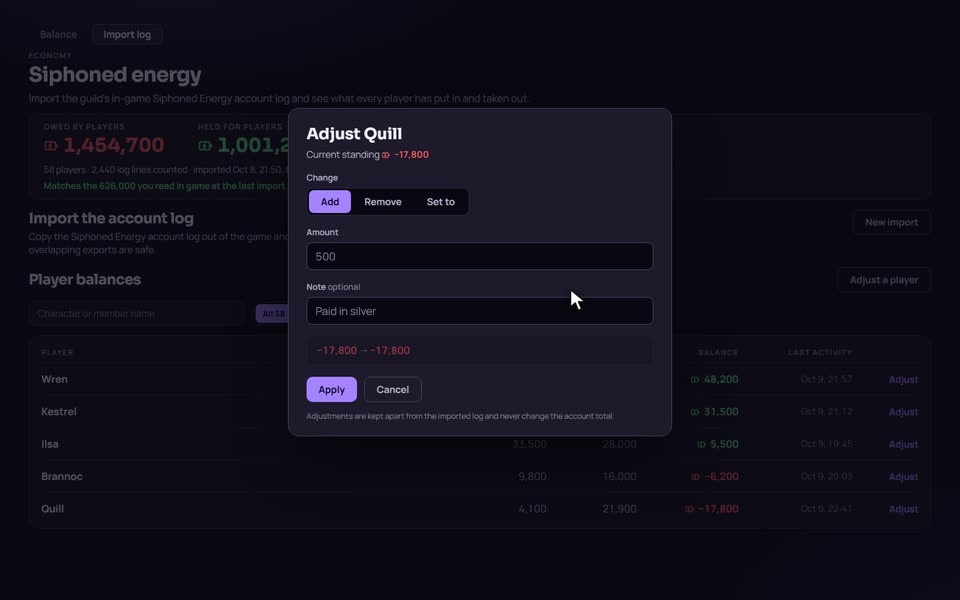
Logs are not always the whole story. A player might pay their debt in silver, or the guild might write off an entry fee. An officer can open a player's row and choose Add, Remove or Set to, with a note. Set to 0 settles someone up. The player sees that an adjustment was made. When you adjust someone who is not in the log yet, type their character name exactly as it is in game, because a typo creates a separate player.
Adjustments never change the account total, which keeps the check against the game accurate. Recent adjustments are listed with who made them and when, and Undo adds an opposite adjustment instead of deleting the original, so the history stays complete.
Starting a new season? A leader can reset Siphoned Energy. It asks you to type the guild name to confirm.
Seeing everyone's standing needs the Report siphoned energy permission. Importing and adjusting also need Adjust siphoned energy. Officers and leaders have both by default, and a leader can grant them to custom ranks.
Compared with spreadsheets
Many guilds paste the log into a spreadsheet and sum it with a formula. That works until two people paste overlapping logs, a line gets sorted out of place, or a member asks what they owe and nobody can answer quickly. AlbionZVZ de-duplicates the lines, checks the paste before it is counted, and lets each member look up their own standing, on the website or with /siphon in Discord.
The trade-off is that it tracks totals per player, not a line-by-line history, and it needs someone to paste the log regularly. It does not read the game directly.
Who it is for
Guild leaders and officers who run crystal content or any activity paid for with Siphoned Energy and need to know who owes the guild, without counting by hand.
Frequently asked questions
Does it read the game automatically?
No. An officer copies the guild's Siphoned Energy account log in game and pastes it on the Import log page. You see a preview first, and nothing is saved until you confirm.
What happens if two officers paste overlapping logs?
Nothing is counted twice. Lines that were already imported are skipped, even lines with the same timestamp, and lines older than the last import are skipped too. If you ever need older history, import the oldest log first.
How often should we import?
The game only keeps recent log history, so import at least every few weeks. Weekly is a safe habit. If your new log starts after the last line you imported, the preview warns you that some lines have aged out and cannot be recovered.
Why does a player show as Unlinked?
The in-game log records character names, not website accounts. Until a member links their Albion character on their profile, their row shows as Unlinked. They still count in the totals, and they see their own standing once they link.
Can we correct a player's standing?
Yes. Officers with the adjust permission can add, remove or set a player's standing, with a note. Adjustments are kept apart from the imported log, so the account total still matches the game, and each one can be undone.
Can we start over for a new season?
A leader can reset Siphoned Energy. It clears every standing, the counted log lines, the officer adjustments and the account total, and the next paste counts as a first import. A reset cannot be undone.
Can members check their standing in Discord?
Yes. The /siphon command shows a member their standing, what they deposited and used, any officer adjustments, a per-character breakdown, and when their last activity and the last import were.