Albion Online ZvZ comp builder: parties, roles and builds
Build an Albion Online ZvZ comp party by party, with a build or a role in every slot, then attach it to events so signups and roster assignment follow the layout. Browse comps other guilds publish and the comps top guilds are seen fielding.
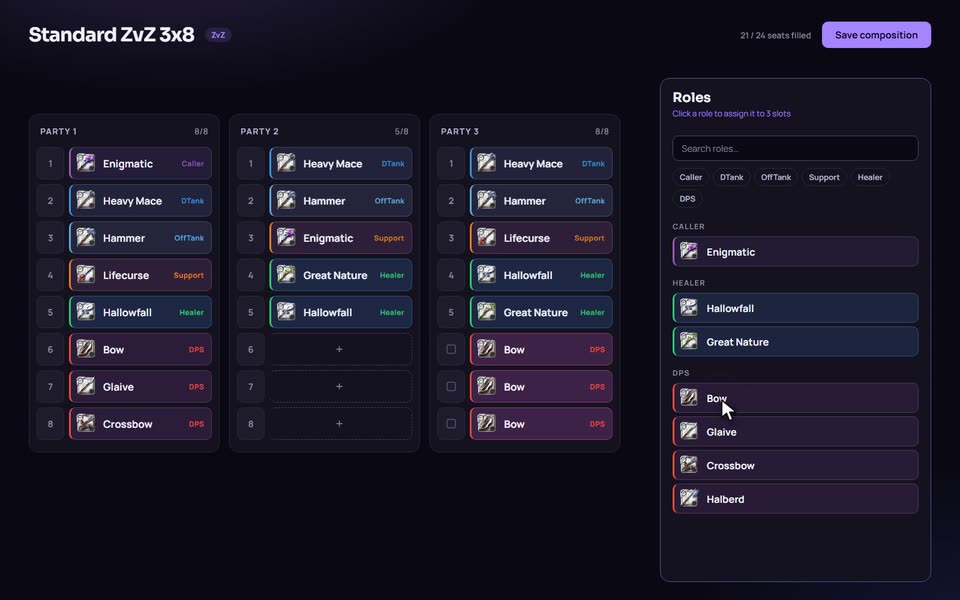
What a comp is
A comp is the template for a whole mass: parties of up to 20 slots, with a build or a role in every slot. A comp can have up to 12 parties. A slot takes one role or build, up to three options for the same seat, or nothing if you want an open seat. A comp is not a roster. It says what you need; the event says who is bringing it.
Roles use the seven playstyles, Caller, DTank, OffTank, Support, Healer, DPS and BattleMount, with the same colours everywhere on the site. Slots can also hold a fill, meaning Any DPS or Fill (Any) rather than one exact build, and the comp keeps a fill list of builds that count as fills, picked one at a time, by tag or by role.
How it works
- Open Comps and click New composition.
- Add a title and your parties. Each party starts as 20 empty slots.
- Fill each slot with a build or an Any role. Drag from the role palette, or tick slot numbers to fill several slots at once (Shift selects a range) and use Copy and Paste for slots or whole parties.
- Hover a role to preview the build behind it. Right-click a slot for change, alternate or clear.
- Add fill builds if some seats are flexible.
- Click Save, then pick the comp when you create an event.
Duplicate copies a comp, which is the quickest way to make a smaller version of a big one.
From comp to event
The comp is copied into the event when you create it, so past events keep the layout they ran with. Signups then choose from the builds in that comp, and officers click or drag players into slots on the event roster. In Discord, /missing lists comp slots still empty and /list-event-signed lists who signed up. Assigning players is website only.
Export build sheet draws a comp's builds on one sheet that you can download as a PNG and post anywhere.
Public comps and what top guilds field
Comps set to Listed appear in the public library at /comps. You can search by comp name, description or creator, sort by Top, Newest or Most upvoted, and import one into your library or a guild. The comp view shows how the builds fit together before you copy.
There is a second source on the site. The comps board under Battles shows comps captured automatically from fights of the 50 most active ZvZ guilds on a server, built from the gear those guilds were seen wearing over the last 14 days. A comp counts as a meta comp when at least two of those guilds run it; a comp run by only one is a signature comp. Open one for its builds and a suggested party layout, pick a size of 20, 30, 40 or 60, and import it into your guild. Captured comps are estimates, and the page says so: they come from gear seen on kills, deaths and assists, so healers and supports on winning sides are under-counted.
Fill seats in detail
Callers often write fills as a list, like "Fills: Rotcaller, Damnation, Spirithunter". The fill list works the same way. A Fill DPS seat accepts the DPS builds already sitting in the comp plus the DPS builds on the fill list, and that list holds up to 50 entries. When you create an event, tag and role rules are turned into the concrete builds that match at that moment and frozen into the event, so a later change to a tag does not rewrite a past event. The editor warns you when a comp has fill builds but no fill seats, because nothing would ever offer them to players.
Organising and sharing
Comps and builds share content tags. Click tags above the list to filter a long library, and officers can manage tags and tag several items at once. Player-owned comps get the same 12 parties a guild comp does, so a personal comp is not limited to a single party. Setting a comp to Listed publishes it to the public library. An unlisted comp stays out of the library and search, though the site notes that anyone holding its direct link can still open it.
Who it is for
- Callers who need the same comp ready every week and want signups matched to it.
- Officers who assign players to slots and need the roster to reflect the layout.
- Small-group leaders who run a single party and only need part of a comp.
- Players scouting what strong guilds bring before they build their own.
How it compares
Signup bots such as Raid-Helper are built around role lists and templates for each event, which is quick for a single night. AlbionZVZ comps are reusable layouts tied to full builds, so a slot is "this build or one of these two alternatives", not just a class label. A spreadsheet can hold the same data, but it does not connect to signups, Discord pings or regear pricing.
For fight data, albion-arsenal.com publishes weapon win rates by fight type. The comps board here is different in scope: it lists whole compositions, not single weapons, and only for the 50 most active guilds of a server. For single-item and build win rates, see ZvZ meta builds.
Limits worth knowing
Captured comps need a guild to have a few well-covered fights on at least two different days before they show, so quieter guilds will not appear. The board does not label comps as brawl, clap or kite. Party layouts on captured comps are suggestions. A public comp only appears if its owner listed it.
Frequently asked questions
How big can an Albion ZvZ comp be on AlbionZVZ?
A party has 20 slots and a comp can have up to 12 parties. Each slot takes one role or build, up to three options for the same seat, or stays open.
What is a fill slot?
A slot that accepts a role instead of one exact build, such as Any DPS or Fill (Any). A comp can also keep a list of fill builds, picked one by one, by tag or by role, so signups for fill seats have real builds to choose from.
Do edits to a comp change events that already used it?
No. Picking a comp when you create an event copies its layout into the event. Later edits to the comp do not change past events.
Can I make a brawl, clap or kite comp?
Yes. Those are names guilds use for how a comp fights, and the editor does not impose a type. Name the comp, describe it, and tag it so it can be filtered later.
Can I turn a comp into an image?
Yes. Export build sheet draws the comp's builds on a sheet you can save as a PNG, and Duplicate in the menu copies a comp so you can adapt it.
Can I copy a comp another guild uses?
Public comps can be imported into your own library or a guild you manage. Comps on the top-guilds board can be imported from their own page.
Are the party layouts in captured comps real in-game parties?
No. For comps captured from fights the party layout is a suggestion built from the players seen, not the parties the guild actually used.