Free VOD review tool for Albion ZvZ: draw, comment and voice-over
Paste a YouTube or Medal link and review a fight straight away: draw over the footage, drop timestamped comments, talk through it with a voice-over, then share one link. Guilds also get a review queue built around ZvZ events and roles.
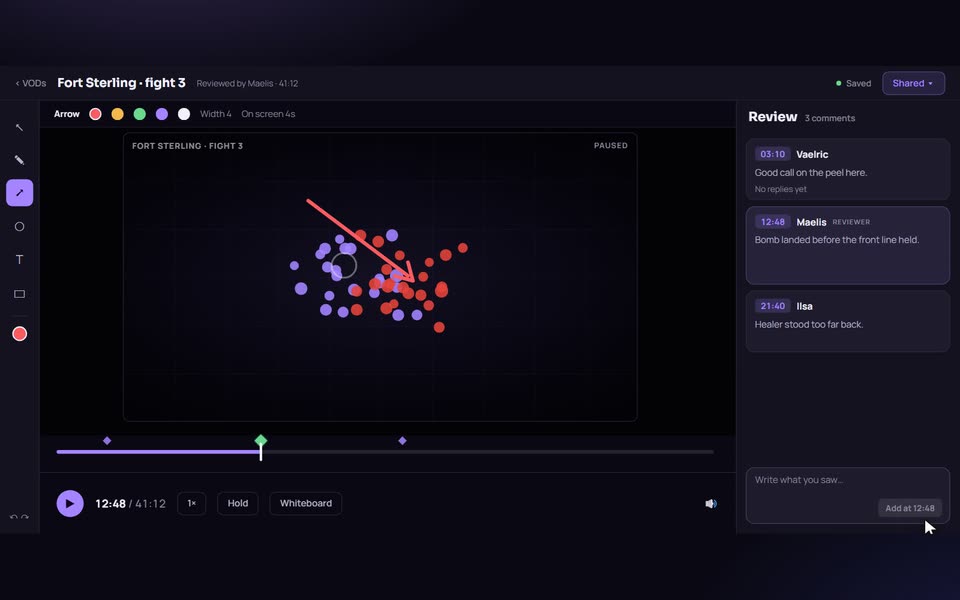
What you can do in a review
The editor puts the video in the middle and your tools around it. Everything you add is pinned to a moment in the video.
- Draw over the frame. Brush, rectangle, circle and text callouts, with colour and undo. A drawing appears where and when you made it and stays up for a set time, so you can circle a rotation or box a misstep while the tape keeps moving.
- Hold the frame. A hold pauses the video during playback, either for a number of seconds or until the viewer continues.
- Timestamped comments. Write a note at the exact second. Click it later to jump straight back. A comment can be up to 2,000 characters.
- Voice-over. Record from your microphone as a short note or a longer commentary. The recording is synced to the video, including the times you paused it, so it plays back the way you gave it.
- Whiteboard. Open a blank board at a moment when a plain diagram explains more than a frame with forty players on it. During playback it appears as a small card on the video and opens full size on click. Guilds can save whiteboard presets and reuse them.
Playback speed, a video and voice volume mix, and keyboard shortcuts (V, B, N, M, T, E for tools, F for hold, R for record, W for whiteboard, space for play) keep a long review quick.
How it works
- Open VOD review and paste a YouTube or Medal link. The title and thumbnail are filled in for you.
- Review it in the editor at your own pace: pause, draw, comment, record.
- Save, then share the link. Anyone holding the link can watch with your drawings, comments and voice playing against the footage.
You can do this standalone with no account. Viewers see a watch mode where drawings appear on time, holds pause the frame, comments are listed with their timestamps, and voice plays in sync.
A practical way to review a ZvZ fight
- Scrub to the first engage and pause. Draw the positions you want to talk about, and add a hold so the viewer's eyes land on it.
- Leave a comment at each decision that mattered: the call, the mount timing, the rotation.
- Use a short voice note for a quick correction, and a longer commentary for the part that needs reasoning.
- Finish with a whiteboard showing the plan you would have run instead.
- Skim the comment list, which is ordered by timestamp, before you share.
Who owns a review
The tool decides this at the moment you save, from whether you are signed in.
- Signed in. The review saves to your profile as a draft you can keep editing. Sharing makes it viewable by anyone with the link, and only you can edit it.
- Signed out. The review is public by design. Anyone with the link can open and edit it, nobody can delete it, and it is credited to Anonymous. This is the quick path for a one-off review, not a place for anything you need to keep.
- In a guild. The review belongs to a VOD in the guild library. Drafts are visible to their author only, and shared reviews to the guild.
The guild workflow
Guilds get a library and a queue around the same editor, built for ZvZ.
- A member or officer clicks Add VOD, pastes a YouTube, Medal or Twitch link, and picks the player, the event, the build or weapon, the playstyle, and a note such as "watch the engage at 4:20, I think I mounted too early".
- The VOD appears under Needs review. An officer picks it up (In review) and reviews it in the editor.
- They give a score from 0 to 10 and set it to Reviewed. The player gets a Discord message with a link.
- The player can reply under any comment, and staff can see how much of the feedback was watched.
Because each VOD is tied to an event, a role and a build, officers can filter the library by those. The VOD analytics add an Uploads roster with ratings, role played and battleboard kills and deaths per player, a Calendar, and a view of how many reviews each reviewer has done.
Who it is for
- Callers who want a second pair of eyes on their own POV, or want to explain a call to the guild.
- Officers who coach and want feedback tied to the exact moment.
- Players who want their own fights reviewed, or want to review a clip for a friend.
How it compares
General review tools such as Coachable and insights.gg work with any video and are built for team coaching in other games. YouTube comments can point at a moment but cannot draw or speak. AlbionZVZ's tool is narrower: it does the draw, comment and voice-over loop well, and ties each VOD to the guild event, role and build behind it. If you need review for a game other than Albion or for a paid coaching business, a general tool may fit better.
Limits worth knowing
Playback needs a video the provider will embed, so a private YouTube video or a deleted Medal clip will not load, though comments and drawings still work. Twitch cannot be played in the editor yet. Voice clips are capped at 6 MB each. Anonymous reviews cannot be removed once saved.
Frequently asked questions
Is the VOD review tool free?
Yes. AlbionZVZ is free for players and guilds, and there are no paid plans today. You can start a review without an account.
Which video sources work?
YouTube and Medal links play in the review editor. Twitch links can be added to a guild's VOD library, but the editor cannot play a Twitch video yet, so it offers a link back to Twitch instead.
Do I need an account?
No to start or save. A review saved while signed out is public: anyone with the link can open and edit it, nobody can delete it, and its author shows as Anonymous. Sign in before saving if you want it to be yours.
How do I share a review?
Save it and copy the link. Signed-in authors use Share, which lets anyone with the link watch, signed in or not, and can unshare it again. A signed-out review is shared as soon as it is saved.
Can the player reply to a comment?
Yes, once a review is shared. Replies need a signed-in account, and people in a thread get a Discord message when someone replies in a guild review.
Do players see their score?
No. Guild reviewers can give a score from 0 to 10, and scores are never shown to players.
Can officers see if a player watched the feedback?
Yes. The reviewer and guild staff see how many of a review's comments the player actually watched, such as 7 of 9. The player never sees that count.
Can I use it for games other than Albion?
The editor works on any YouTube or Medal link. The guild queue, roles and builds are built around Albion ZvZ.