Objectives tracker for Albion Online guilds
AlbionZVZ keeps your guild's open-world objective timers in one list: nodes, vortices, cores, chests and Ancient Lands portals, with UTC unlock times, on the world map and in a Discord board that updates itself.
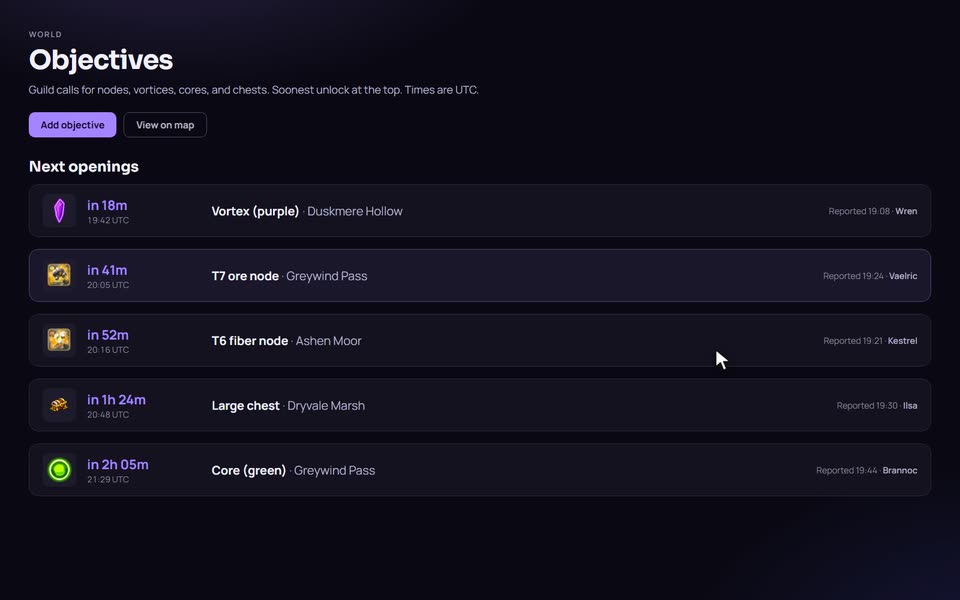
What it does
Objectives are the things that spawn or open in the world on a timer: resource nodes, crystal vortices and cores, chests and Ancient Lands portals. Scouts see them first. Everybody else needs to know when and where.
AlbionZVZ gives your guild one list for that. Anyone in the guild reports an objective, the soonest unlock sits at the top, and the same data shows up on the world map and in a Discord board. All times are in UTC.
How it works: reporting an objective
You can add an objective three ways: by hand on the website, from a screenshot on the website, or from a screenshot in Discord.
By hand
- Open Objectives in the guild menu and press Add objective.
- Choose What are you reporting? The options are Node (with its resource, Wood, Fiber, Ore or Hide, and its tier from 4.4 to 8.4), Vortex and Core (with a crystal color), Large chest, Medium chest, Large, Medium and Small portal, or Other with a free label.
- Pick the map. You can search zones by name or id.
- Set the time. From now takes hours and minutes after you save. Pick date and time takes a UTC date and time. For a portal, choose Opens in or Closes in.
- Save. It appears in the list under Next openings.
From a screenshot
The in-game popup already tells you the objective, the zone and the time. Reading it from the screenshot saves the typing.
- Take a screenshot of the objective popup. PNG or JPEG, up to about 2 MB.
- Upload it in the Add objective dialog on the website, or run
/objective addin Discord and attach it. - A vision model reads the image and shows you what it found: the objective, the map and the unlock time.
- Fix anything it got wrong, then confirm. Nothing is posted until you do.
On the website, the review screen counts the timer down from the moment the screenshot was read and takes off a 45-second buffer for capture and upload, so the listed unlock leans early rather than late. Screenshot reads are limited per person and per guild, as the FAQ explains.
From a screenshot in Discord
Run /objective add and attach the screenshot. The bot answers privately, so the channel stays quiet, with what it read and a few buttons: Confirm, Cancel, Fix zone and Fix time. If it misread a node or a crystal, drop-downs let you change the resource, the tier or the color. You need to be registered and in the guild to use it, and only confirmed objectives reach the guild list, the map and the board.
Where the objectives show up
- The guild list. Soonest unlock first, with the time in UTC.
- The world map. Open View on map from the objectives page, or go to the map and pick your guild on the Objectives tab. Objectives are pinned to their zones with an icon and a countdown. With your guild selected, right-click a zone to add an objective there.
- A live board in Discord. An officer runs
/objectivesin a channel. The bot posts a board of upcoming objectives with a live countdown on each row and an Add objective button. The button explains the screenshot command and offers a manual step-by-step option. The board refreshes itself, so the channel does not need constant reposting.
The map and the route planner
The world map is public, and it is more than a backdrop for objectives. The Directions tab is a quickest-path planner between two zones: pick a From and a To, and it lists the route stop by stop. Two options change the route. Use static shortcuts lets it use the fixed shortcuts between zones, and the planner shows the cost of the open-world route next to the cost with shortcuts so you can see what the shortcut saves. Avoid portal & rest zones skips Outlands portal cities and rest camps, which can reset home or block outlaw players.
Seeing guild objectives on the map needs a login, because objectives belong to a guild. If you are in more than one guild, choose which one to show.
Details that matter
- Portals have two clocks. A portal that is still locked counts down to opening. A portal that is already open counts down to closing. Choosing the wrong one gives you the wrong window, so pick the one that matches the popup.
- Mistakes are easy to fix. An objective can be deleted by whoever reported it or by staff with the Manage objectives permission.
- Screenshot reads have a daily allowance. It depends on the guild's plan, and the Free plan allows 50 a day.
- It is a guild tool. Objectives belong to a guild. The public world map works for everyone, but guild objectives need you to be signed in and in the guild.
Compared with pins and spreadsheets
Guilds often track objectives with pinned messages, a shared sheet, or a scout typing a timer into a channel. All of those work until the scout is offline, the pin is buried, or somebody converts a time zone wrong. Putting the timer in UTC, on a map and in a self-updating board removes most of that.
Reading the screenshot is the other difference. Typing a zone and a countdown mid-fight is easy to get wrong. The trade-off is that a vision model can misread an image, which is why every read is reviewed before it is posted.
Who it is for
Scouts and callers who find objectives, and guild members who want to know what opens next without asking in chat.
Frequently asked questions
Can I add an objective from a screenshot?
Yes. Upload a PNG or JPEG of the in-game objective popup on the website, or run /objective add with the screenshot in Discord. An AI vision model reads the zone, the objective and the timer, and you confirm or correct it before it is posted. Always check the result, because a model can misread an image.
What if the screenshot is read wrong?
You review it before anything is posted. You can fix the map zone, the objective details and the time on the review screen, or add the objective by hand.
Are the times in my time zone?
Times are shown in UTC, which matches the map and the rest of the site. When you add an objective by hand you can enter it as hours and minutes from now, or as an exact UTC date and time.
How are portals handled?
Small, medium and large portals in the Ancient Lands have two states. Choose Opens in when the popup counts down to opening, or Closes in when the portal is already open and its entry window is running out. The site checks that a close time fits the entry window for that portal size.
Who can add and delete objectives?
Any guild member can report an objective. The member who reported it can delete it, and so can staff with the manage objectives permission.
Is there a limit on screenshot reads?
Yes. Each person can read a handful of screenshots a minute, and each guild has a daily allowance set by its plan. The Free plan allows 50 screenshot reads a day, and other plans set their own number. If you hit a limit, add the objective by hand or try again later.
Does the Discord board need a channel of its own?
It works best in one. The /objectives command posts a live board in the channel where you run it, with the soonest unlock first and a live countdown for each row. The board is refreshed automatically, and it has an Add objective button.