Albion Online ZvZ builds: library, editor and in-game copy
Build a full Albion Online ZvZ loadout slot by slot, with tiers, enchants, abilities, food and up to five swaps per slot. Share it with your guild, look it up in Discord, or copy it into the game's own loadout screen.
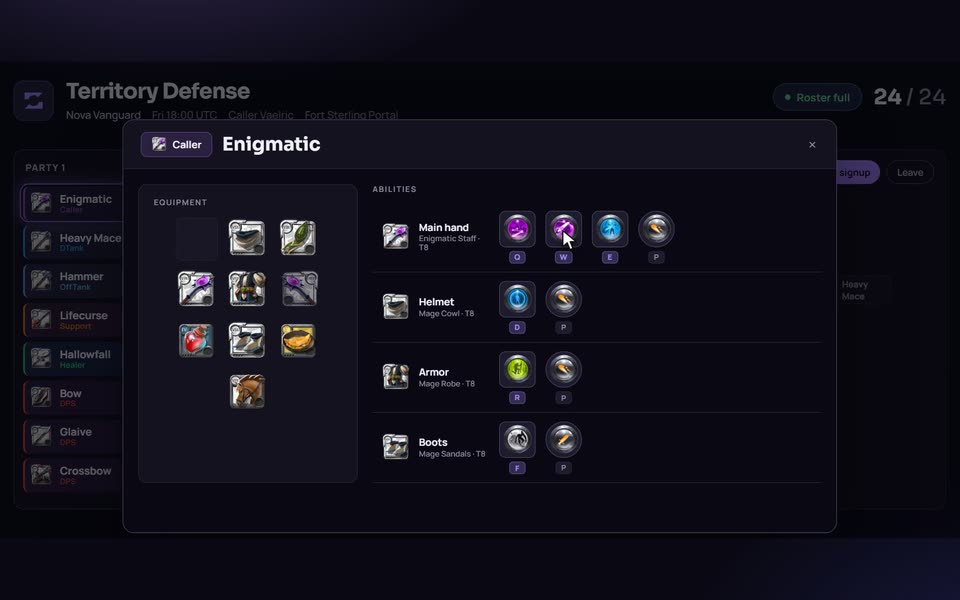
What a build holds
A build is one player's whole kit for one job in a fight. The editor has a slot for the main hand, off hand, head, chest, shoes, cape, mount, food and potion. Each gear slot takes an item, a tier, an enchant and the abilities you want on that piece, so "Hallowfall with this armour spell and that boots spell" is a single saved thing instead of a paragraph in a Discord pin.
Every gear, food and potion slot can carry up to five swaps: alternative pieces a player may bring depending on the fight or on what they can afford. Mounts do not have swaps. A text box holds the instructions for the role, and a build can carry a regear value in silver, typed in by hand or estimated from current market prices.
Each build has one playstyle: Caller, DTank, OffTank, Support, Healer, DPS or BattleMount. Role colours follow the rest of the site, with DPS red, tanks blue and callers purple.
How it works
- Open Builds in your guild or in your personal library and click New build.
- Give it a name and choose a playstyle.
- Pick an item for each slot, then set tier, enchant and abilities. The item picker is built on the game's item catalog, so the tiers and enchants you can choose are real ones.
- Add swaps for gear, food or potion where it matters.
- Write the instructions for the role and click Save all.
- Put the build into a comp slot or an event. Players see it on the event page and can look it up in Discord with
/build, and/zvz-buildslists the guild's ZvZ builds. Creating and editing stays on the website.
Staff can also merge duplicates. If a guild ends up with "Hallowfall", "Hallowfall v2" and "hallow NEW", select two or more builds, pick the one to keep, and every comp that used the others points at the survivor.
Copy to the game and back
Albion has its own loadout feature that copies a loadout as JSON. AlbionZVZ speaks that format in both directions.
- Copy Albion loadout turns a build into game JSON. Gear at item power 8 or below is written as that plain tier, and anything above 8 is written as T8 with the enchant that makes up the difference. Item quality is written as Normal, food defaults to a stack of 3 and potions to a stack of 5, and the loadout name is cut at 40 characters. The Swaps in inventory switch adds your swaps to the loadout's inventory.
- Paste from Albion in the editor fills a draft from a loadout copied in the client, including active and passive abilities, and offers Inventory gear as swaps. Anything it cannot map is reported as a warning.
This is the fastest way to move a new player from "here is the build" to "it is on my character".
The public library
Builds set to Listed appear at /builds. You can search by weapon, build name or creator, filter by playstyle and content type, and sort by Top, Newest or Most upvoted. Verified and Featured badges mark builds that platform staff have reviewed. Reading and copying a public build needs no account; upvoting and importing a build into your library or a guild do. When you import into a guild you choose the guild library, which officers manage, or the Community area, which any member can add to.
Where a build gets used
- Comps. Each comp slot is filled by a build or by an "Any" role such as Any DPS, so a comp is a list of builds placed in parties. See the Comps page for how those are laid out.
- Events. A comp attached to an event carries its builds, and signups pick from the builds that sit in the comp.
- Regears. Officers set silver per death for each playstyle, and a custom price on a specific build under Build overrides wins over the playstyle price. Preview EMV can fill prices from market data.
- Discord.
/buildlooks up one build and/zvz-buildslists the guild's ZvZ builds, so a player can check gear without opening the site.
Who it is for
- Callers and officers who keep the guild's set of builds in one place and attach them to comps.
- Players who want to plan a set before spending silver, or who want their own builds to be linkable.
- New members who need to see exactly what to bring, down to the abilities, and put it into the game without hunting for each piece.
How it compares
| Need | Spreadsheet or pinned image | AlbionZVZ builds |
|---|---|---|
| Quick one-off note | Fast, no setup | Slower than typing a line |
| Real tiers, enchants, abilities | You type them and they can be wrong | Picked from the item catalog |
| Alternatives per slot | Extra columns | Up to five swaps per slot |
| Reuse in comps and events | Copy by hand | Linked, so an edit reaches every comp |
| Into the game client | Retype each piece | Copy Albion loadout |
Build guide sites such as AlbionOnlineGrind and MetaBattle are the place to learn what experienced players recommend. AlbionZVZ builds are your own kit, editable and wired into comps and events. If you want to see what is actually being worn in large fights, the ZvZ meta builds boards cover that, and the Builds page links to them.
Limits worth knowing
Build tiers are stored as item power, so the export picks one plain combination for that power rather than the cheapest equivalent on the market. Quality is always exported as Normal. A pasted loadout is parsed strictly; text that is not Albion loadout JSON is rejected with a message. Public library entries only exist when their owner set them to Listed.
Frequently asked questions
How do I make an Albion ZvZ build?
Open Builds, click New build, name it and pick a playstyle, then choose an item for each slot and set its tier, enchant and abilities. Add swaps if players may bring alternatives, write what the player should do in the role, and click Save all.
Can I copy a build into the Albion Online client?
Yes. A build page has a Copy Albion loadout button that puts Albion's loadout JSON on your clipboard, ready to paste into the game's loadout feature. Public builds can be copied without an account.
Can I import a loadout from the game?
Yes. In the build editor, Paste from Albion reads a loadout copied in the client and fills the draft, including abilities. Items or spells the editor does not recognise are listed as warnings instead of being silently dropped.
How many swaps can a slot have?
Up to five on each gear, food and potion slot. Mounts have no swaps. Swaps can also be exported into the inventory part of the game loadout with the Swaps in inventory switch.
Which roles can a build have?
Seven playstyles: Caller, DTank, OffTank, Support, Healer, DPS and BattleMount. Comps and events use the same list, so a build always fits a slot of its own role.
Can I share builds without being in a guild?
Yes. Signed-in players keep a personal library and can set a build to Listed to publish it in the public library. Guild builds are managed by officers, and members can add builds under Community.
Does this tell me which build is best?
No. This is the tool for writing builds down and handing them out. For what players actually wear and how often those fights were won, use the ZvZ meta builds boards.
Is it free?
AlbionZVZ is free for players and guilds; there are no paid plans today.