Discord bot for Albion Online guilds
The AlbionZVZ bot runs your guild's operations inside Discord: it posts events with signup buttons and a live roster, sends players their builds, registers new members, and answers balance, objective and build questions with slash commands.
What the bot does
Your guild already lives in Discord, so the bot does the work there. It covers six jobs:
- Events. Post a ZvZ or CTA with signup buttons, a live roster and reminders.
- Builds. Send each player a private message with the build they are seated on, and look up any guild build with a command.
- Registration. Let new members join with
/register, verified against your in-game roster or Discord roles. - Money. Check balances, pay members and run the guild bank without leaving chat.
- Objectives. Add objectives from a screenshot and keep a live board in a channel.
- Killboard. Post your guild's battles to a channel automatically.
How it works
- Open Integrations on your guild and add the bot to your Discord server.
- Run
/link-serverin Discord. The page gives you the command to copy. - Pick which Discord roles can run officer commands and member commands, or leave it on the defaults.
- If leaders want members to register through Discord, choose how they are verified: the in-game roster, or Discord roles.
Officer commands may take a minute to appear after you save.
Events in Discord
Officers can create and post events with /event create and /event post, from a saved preset, as a flash mass, or from an event link. The post is a card with the title, start time in UTC, time left, comp, mass location, caller and your notes. It carries signup buttons, and with Show signups on it carries a live roster that rewrites itself as people join. On Self-assign and Open parties events it adds role pickers and Join and Leave buttons.
There is also a message command. Paste an event link into a channel, right-click the message, and choose Post AlbionZVZ event under Apps. The details are on the event signups page.
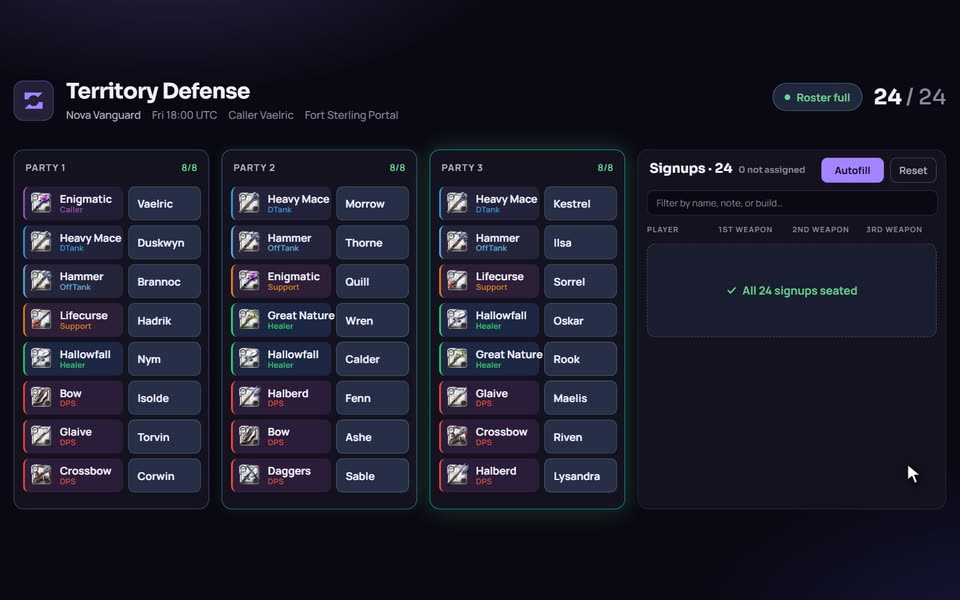
Two safeguards matter for officers. The bot posts an everyone mention only for a poster who is allowed to use it in that server, and a role ping is always an explicit choice. And automatic reminders can be turned on in Settings, with a lead time from 1 to 180 minutes (the default is 15), posting a reminder card with the same signup buttons.
Commands
| Command | Who | What it does |
|---|---|---|
/register | Members | Starts joining the guild on the website |
/link-server | Leaders | Links this Discord server to your guild |
/event create, /event post, /event list, /event show | Officers (post: members) | Create, post, list and inspect events |
/missing | Officers | Lists event signups who are not in a voice channel, with an optional late nudge |
/list-event-signed | Officers | Lists Discord mentions for everyone signed up |
/build, /zvz-builds | Members, officers | Full gear and ability details for a guild build, and a list of builds by playstyle |
/objective add, /objectives | Members, officers | Add an objective from a screenshot, and post a live board |
/balance or /bal, /pay, /bank, /siphon | Members | Your balance, paying members or the guild, the leaderboard, and your Siphoned Energy standing |
/unregistered-members, /verify-website-members | Officers | Who is in Discord but not on the guild, and who is on the guild but not in Discord |
/ping-onboarding | Officers | Posts a welcome card with Register and Discord buttons |
/killboard-link, /killboard-status, /killboard-unlink | Officers | Manage the killboard feed |
/cta, /flash-mass, /events and /content-ping still work but are marked deprecated in favor of /event.
Direct messages and pings
- Build DMs. When you press Ping on an event, every assigned player gets a private message with the caller, mass location, sets and the build they are seated on, with a gear image. Players can opt out of bot pings.
- Reminders. A card posted a set time before the event, if your guild has them on.
- Payout receipts. Leaders can turn on receipt DMs. A paid player gets their share, regear and new balance, and never sees what the guild kept.
- Onboarding.
/ping-onboardingposts a welcome card, and leaders can message members who have not linked an in-game account.
Money in chat
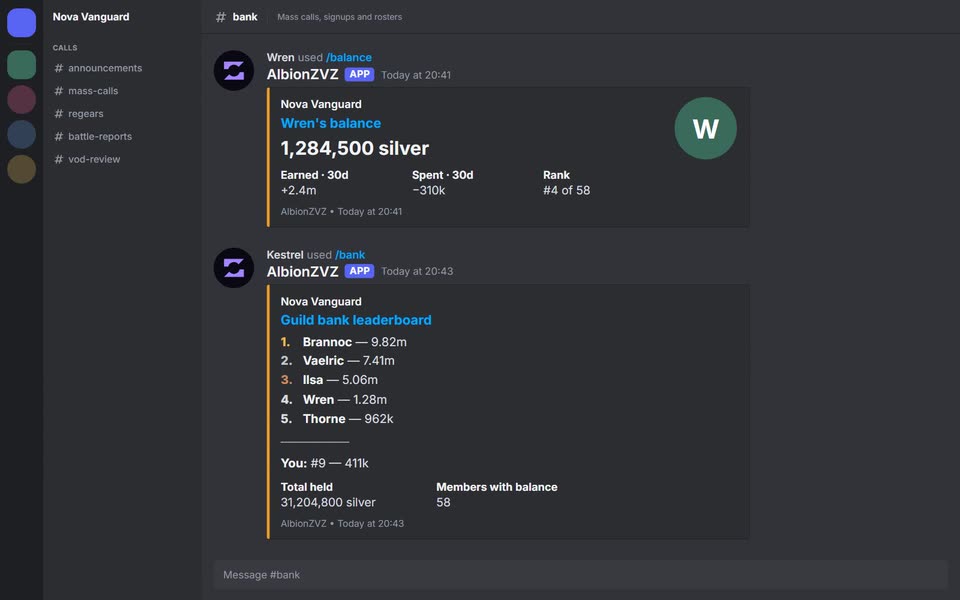
/balance shows a card with your balance, what you earned and spent in the last 30 days, and your rank in the guild. /pay to: amount: accepts members, roles or the word bank, and amounts like 500k or 1.5m. Amounts are per person unless you set split. Officers can grant, remove or clear balances with /bank give, /bank remove and /bank clear, with a note that appears in the member's history. /siphon shows your Siphoned Energy standing. A player who signed up through Discord without an account has a Discord-only balance, and /balance shows it.
Registration and roles
When a member runs /register, the bot replies privately with a link to onboarding. If the guild verifies against the in-game roster, the bot can grant the guild's Discord roles once the character is confirmed, and can set the member's Discord nickname to their Albion character name with an optional prefix. Sister guilds that you approve can register against their own rosters and receive their own roles. Rank changes made in Discord are reported to the website, which applies them according to how your ranks are bound to roles.
What it does not do
The bot does not replace the website. You create builds and compositions on the site, assign players on the event page, and run payouts there. The bot does not read the game itself. And outside the killboard feed, a Discord server needs to be linked to an AlbionZVZ guild for the commands to work.
Compared with generic event bots
Raid-Helper and similar bots are general event tools used across many games. They are a good fit when all you need is a signup list in a channel. AlbionZVZ's bot is narrower and deeper: it knows Albion builds and compositions, seats players in a comp, sends them their gear, and ties the event to regears, attendance and the guild bank. If your guild already runs on another Albion-specific manager, compare what each one covers before switching.
Who it is for
Guild leaders, officers and shotcallers who run ZvZ from Discord and want events, builds, balances and onboarding to happen where their members already are.
Frequently asked questions
Do I need the website to use the bot?
For most of it, yes. Events, builds and balances live on the website, and the bot is a front end to them. Creating builds and assigning players are website tasks. The one exception is the killboard feed, which works for any Discord server without an AlbionZVZ guild.
Who can run which commands?
Commands have four levels: anyone, members, officers and leaders. By default officer commands need Administrator, Manage Server or Manage Events in Discord. You can instead pick the Discord roles that count as officers and members on the Integrations page.
Can the bot post events in more than one Discord server?
Yes. The server linked to your guild is the home server. In other servers, a member can post a guild event if they hold the right to post externally for that guild on the website. Leaders and officers have it by default.
Does the bot ping everyone?
Only if the person posting is allowed to. When you post an event you choose to ping everyone, a role, or nobody. If the poster is not allowed to mention everyone in that server, the card is posted without the mention. Killboard posts never mention anyone.
How do members register through Discord?
They run /register. The bot replies privately with a link to onboarding on the website, where they log in with Discord and link their Albion character if asked. Depending on how the guild verifies members, it checks the in-game roster or the member's Discord roles.
Is the bot free?
Discord integration and Discord event notifications are included on the Free guild plan. Plans set limits on things like saved comps and builds, so check your guild's billing page for the details.
Can players turn off the bot's DMs?
Yes. Players can switch off Discord bot notifications in their profile. Build DMs and payout receipts skip anyone who has turned them off or whose Discord direct messages are closed.