Albion Online market prices: price checker for every city
Look up any Albion Online item's price by tier, enchant, quality and city on the Europe, Americas and Asia servers, with the age of every price shown. A tier-by-enchant grid and a crafting profit finder sit on the same data.
What you can look up
The marketplace section has three tools on one price source.
- Prices. A searchable list of items with their sell price in each city.
- Item page. One item across all cities, with a Black Market panel and every quality.
- Crafting Profit Finder. Crafts ranked by profit, margin, volume or silver per focus.
Use the server switch for Europe, Americas or Asia. Search by name or by shorthand such as "claymore", "4", "4.3" or "gig pot", filter by category, tier, enchant, city and quality, and turn on Priced only to hide items with no quote. Sort by Name, Cheapest price, Biggest spread or Best match.
How it works
- Open Market and pick your server.
- Search an item or filter by category, tier and enchant. Each row shows the item, its price in the cities and when it was scanned. A small strip shows the sell price per city so the cheapest stands out.
- Open an item. The cities table lists Sell min, Buy max, Spread and Updated for every city and marks the cheapest. A Black Market panel shows its buy price, since that market buys from players. A quality strip and an Other tiers list help you compare.
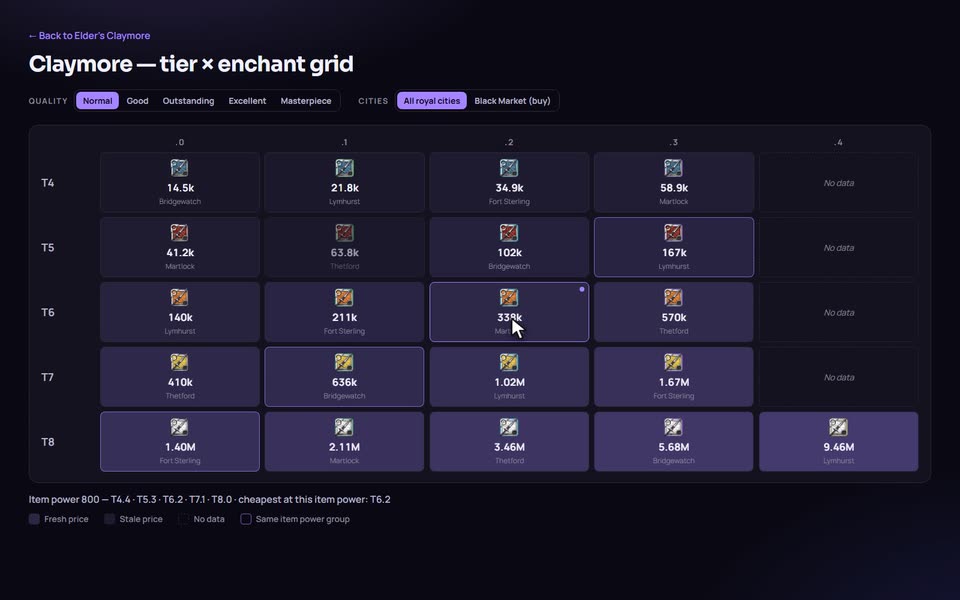
- Open the tier by enchant grid. Every real tier and enchant of the item appears in one table, coloured by fresh, stale or no data, and hovering a cell highlights everything with the same item power. The Cheapest at this item power note is useful when a lower tier with an enchant costs less than a higher base tier.
- For crafting, open Crafting Profit Finder, set your station and specs, and read down the ranking.
Tiers, enchants and quality
Some tier and enchant combinations reach the same item power, which is why the grid groups them and flags the cheapest at that item power. Equipment trades at five qualities, Normal, Good, Outstanding, Excellent and Masterpiece. Food, potions and many other items trade at one, so for those the quality filter does not apply and the page says so instead of silently ignoring it. Mounts depend on the mount: ones that trade at several qualities use the filter, unique ones do not.
Where the prices come from
All prices come from the Albion Online Data Project (AODP), which collects market orders from players. AlbionZVZ sweeps AODP for the whole item catalog plus the materials the crafting finder needs, on each server in turn, and stores one row per item, city and quality with the time it was scanned. It stores its own copy so the pages load quickly and do not call AODP when you search.
That design has a consequence you should know: a price is as old as the last scan. Items that few players look at can go stale. The page never hides this:
- every price shows its age;
- the headline price prefers a fresh quote over a cheaper stale one, and when only stale quotes exist it shows the cheapest and flags it stale;
- a price older than 24 hours counts as stale, and so does one the source never gave a scan time for;
- missing data reads "No data", never zero;
- a banner shows when the last sweep finished and warns if updates are delayed.
The crafting profit finder
The finder ranks crafts for the settings you give it. You choose where you craft (a royal city, a hideout, or automatic), your item and mastery specs, whether you use focus, the station fee and whether you have premium. It then prices materials from sell listings or from buy orders, as you choose, and the product in the best royal city, one city or the Black Market.
Profit is the sale price less market tax (4 percent with premium, 8 percent without, plus a 2.5 percent setup fee on sell orders), less materials after the resource return you earn, less the station fee. Ranking can be by profit, margin, volume or silver per focus, and volume uses the sales window you pick: the last day, 7 days or 30 days. Quotes older than seven days are ignored. Open shopping run gives a buy plan and sell cities for a craft.
My crafting specs stores your levels per tree, in the browser, and in your account if you sign in.
Who it is for
- Players checking what a set costs before they buy it, or which city is cheapest.
- Crafters deciding what is worth making this week.
- Officers who want a feel for what a set costs. Regear settings have their own Preview EMV button, which estimates set prices from market data.
How it compares
Several sites cover the same ground from the same community data. AlbionOracle lists lowest sell and highest buy per city, price age, history charts, alerts and a watchlist. Albion Free Market adds flipping, refining and upgrade calculators. As of September 2026 AlbionZVZ does not have charts, alerts or flip finders, so choose one of those if that is what you need. What AlbionZVZ offers is the tier by enchant grid with item power grouping and a crafting finder that takes your own specs, next to the guild tools your officers already use.
Limits worth knowing
The price pages show only the latest quote per city and quality; recent sales volume is used by the crafting finder. Prices are crowd-sourced and can lag in quiet cities. Gear is covered across the catalog, along with mounts, food, potions and the crafting materials the finder needs, not every item in the game. The finder's hideout bonus is an estimate because the formula is unverified.
Frequently asked questions
Where do the prices come from?
From the Albion Online Data Project, a community-run project fed by players' game clients. AlbionZVZ stores the latest quote for each item, city and quality and shows when it was scanned.
How current are the prices?
A background sweep refreshes the stored prices on a fixed interval, 30 minutes unless the operator changes it, but a price is only as new as the last player scan. Each row shows its age, and a price older than 24 hours is marked stale.
Which cities are covered?
Thetford, Fort Sterling, Lymhurst, Bridgewatch, Martlock, Caerleon, Brecilien and the Black Market.
What do Sell min and Buy max mean?
Sell min is the lowest sell order seen in that city. Buy max is the highest buy order. Spread is the gap between them. At the Black Market, which buys from players, the buy price is the one that matters.
Which servers does it cover?
Europe, Americas and Asia. A server switch sits above the prices and the choice is kept in the address.
Does it show price history, alerts or flipping?
Not today. The price checker shows the latest quote per city and the crafting finder uses recent sales volume. Sites such as AlbionOracle offer charts and alerts.
How does the crafting profit finder work out profit?
From your station, specs, focus and fees, the recipe's materials at current prices, and the sell price less market tax. Items with a missing price show no profit instead of a guess. The hideout bonus is marked as an estimate.
Do I need an account?
No. Your crafting specs are saved in your browser, and signing in keeps them across devices.