Event signups for Albion Online ZvZ and CTAs
AlbionZVZ turns a ZvZ or CTA into one event page with a shareable link and a Discord post. Players sign up with the roles they can play, and the caller seats them in the comp.
How event signups work
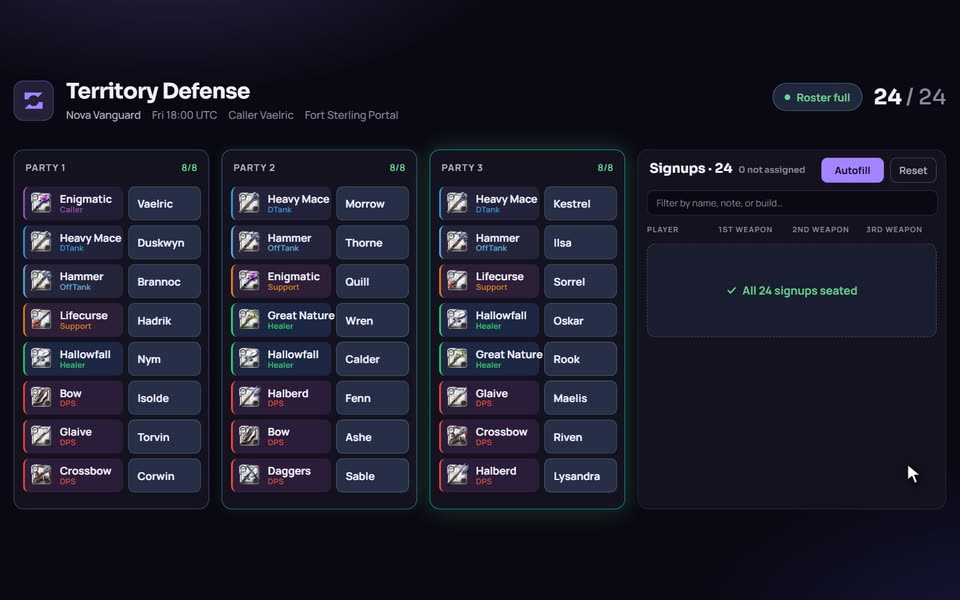
An event is a page at a share link plus an optional post in your Discord. You pick a time, a signup mode and (for most modes) a comp. Players open the link or press a button in Discord, choose what they can play, and appear on the roster straight away. The caller sees the same roster and seats people.
- Create the event. Give it a title, a start time in UTC, a caller and a mass location. Add a brief for the signup page: target, gear expectations, anything people should read first. Need one now? Use a flash mass.
- Choose how people get into seats. Pick Caller assign, Self-assign, Open parties or Live comp (details below).
- Set who can sign up. Public, Guild only or Hidden. You can also choose whether members can see who signed up. Officers always can.
- Post it in Discord. Pick a channel, who to ping (everyone, a role or nobody) and whether to show the live roster. Or copy the link and post it yourself.
- Watch the roster fill. Signups show up live for everyone on the page. Seat players, fix gaps, then press Ping to send each assigned player a private message with their build.
- Finish the event. Marking it finished locks the roster. Attendance, regears and payouts read from that roster afterwards.
Four ways to fill the roster
You choose per event, so one guild can run a tightly called ZvZ on Saturday and an open skirmish on Tuesday.
| Mode | Who places people | What players do | Needs a comp |
|---|---|---|---|
| Caller assign | The caller | Sign up with the roles they can play, in preference order. The caller places each one in a seat. | Yes |
| Self-assign | Players | Click Join on a free seat that fits them. First come, first served. | Yes |
| Open parties | Nobody, parties fill in join order | Join on the rally page. No saved comp is needed. | No |
| Live comp | The caller, during the mass | Sign up with the weapon they are bringing. The caller builds the comp from who turned up. | No |
Caller assign is the classic CTA. It is the mode with the most tools, because the caller is doing real work: Autofill, the signup list, rules and history all live there.
What players do
On the event page a player adds the roles they can play and ranks them. Autofill gives the first choice priority over the rest. Players can mark themselves tentative and leave a note for the shotcallers, such as "bringing an alt" or "late". Anyone can edit the signup or leave until the event is closed.
Players who sign up often can save their usual roles on the Auto signup page. After that, the Auto Sign Up button on a Discord post does the whole thing in one click, and Tentative does the same but marks them tentative.
Tools for the caller
- Autofill. One button fills empty seats from the signup list. It only fills empty seats and keeps the placements you already made. It prefers Party 1, then each player's higher-ranked roles. It uses confirmed players first and only reaches for tentative ones when no confirmed player is left unplaced.
- Most needed. The signup dialog shows what the comp still lacks, counting each player once, so a player who lists three healer builds does not make the healer seats look full.
- Open seats. On a caller-assigned event, open specific empty seats and late arrivals can click Join on them without pinging the caller.
- Bench. On Self-assign events, players who cannot get a seat can join the bench for the roles they play. When a seat frees up, the first bench player who fits is seated.
- Party tools. Duplicate or delete parties, change a slot's role, sort the signup list, and widen the signup column on a big roster.
- Signup history. A log of who joined and left, and how long before or after the start. It settles arguments about who really signed up in time.
- Voice check. List signups who are not in your Discord voice channel, and ping the missing ones. The
/missingcommand does the same from Discord. - Player list. Copy the signed-up players as Discord mentions in one click.
Signup rules
To stop players signing up with one lone role, set a rule. A rule can require a minimum number of roles, a minimum number of different playstyles, and a number of roles from a specific playstyle (for example one Support). Each event can use the guild default, no rule, or its own rule. The signup dialog shows players what is still missing as they pick roles. Rules apply to Caller assign and Live comp events.
The Discord side
The Discord post is a card with the title, start time in UTC, time left, comp, mass location, caller, sets and your notes, plus buttons: Open (the web page), Auto Sign Up and Tentative. Open parties events get a Join button instead of Auto Sign Up and Tentative.
When Show signups is on, the live roster sits inside the message and rewrites itself as people sign up or leave. On Self-assign and Open parties events that roster also carries role pickers and Join and Leave buttons, so people can claim a seat without leaving Discord. Two limits to know about: the Discord roster shows up to three parties (the web page shows every party), and if a roster cannot fit in one Discord message the bot posts a compact card without it.
Guild officers can create and post events with /event create and /event post, including from a saved preset or as a flash mass. Leaders can also turn on automatic reminders in Settings, and players can opt out of bot pings.
Compared with spreadsheets and Raid-Helper
A spreadsheet is flexible and everyone already knows it. It does not know which weapons a comp needs, cannot message each player their build, and has no link to your regear or attendance records.
Raid-Helper is a general-purpose Discord event bot that serves many games. If all you need is a signup list in Discord, it can be enough. AlbionZVZ is built only for Albion, so comps, builds, caller seating, regears and battle data are part of the same system. One thing to know before you switch: presets re-create a regular event with one click, but they do not create events by themselves.
Who it is for
Guild leaders and shotcallers running regular ZvZ, CTA and small-scale content who are tired of chasing reactions and retyping rosters. Individual players can also create a public event without a guild or a comp, which suits pickup groups.
Frequently asked questions
Do players need an account to sign up?
It depends on the event's visibility. On a Public event, anyone with the link can join by typing a nickname or logging in with Discord. On a Guild only event, registered guild members can join. A Hidden event is not listed for members, but any guild member who has the direct link can join.
Can the Discord post update itself as people sign up?
Yes. When you post an event you can turn on Show signups. The Discord message then carries the live roster and rewrites itself as the roster changes, instead of you reposting it. The Discord roster shows up to three parties; the event page on the web shows all of them.
What does the Auto Sign Up button on the Discord post do?
It signs you up using the roles you saved on your Auto signup page, limited to the roles that exist in that event's comp. You need your Discord account linked to AlbionZVZ, a guild membership and at least one saved role that fits. If something is missing, the bot replies privately with a link to fix it.
Can I stop people from signing up with one role only?
Yes. A signup rule can require a minimum number of roles, a minimum number of different playstyles, or a number of roles from one playstyle, such as one Support. You can set a guild default and override it per event. Rules apply to Caller assign and Live comp events.
What happens when a seated player drops out?
Their seat opens and shows as empty. On Self-assign events, players who could not get a seat can join the bench for the roles they play, and the first fitting bench player is seated when a seat frees up. On Caller assign events the caller reseats from the signup list.
Can I reuse a regular event, like a weekly CTA?
Yes, with presets. Save an event as a preset and one click creates it again at the saved time. Presets do not create events on their own, so someone still has to click, or run the /event create command with a preset.
Is the bot free to use?
Discord integration and Discord event notifications are included on the Free guild plan. Plans set limits on things like saved comps and builds, so check your guild's billing page for the exact numbers.