Loot split and guild payouts for Albion Online
AlbionZVZ works out your ZvZ loot pool from EMV, silver bags, repairs and guild tax, takes out regears and extras, divides the rest by player share, and adds each person's cut to their guild balance with one click.
How the loot pool is worked out
The pool starts with what the fight earned and ends with what is left to share between players. You enter six numbers, and you need at least EMV loot or silver bags.
| Field | What to enter |
|---|---|
| EMV loot | Estimated market value of all the items looted |
| % EMV sold | How much of that loot you actually sold. Only the sold part counts (the default is 80) |
| Silver bags | Raw silver picked up during the event |
| Repair cost | Silver spent on repairs, taken off first |
| Guild Tax Raw Silver | A flat amount the guild keeps, taken off first |
| Guild Tax | A percentage the guild keeps from what is left |
The maths is two lines:
- Loot = EMV loot x % sold + silver bags - repair cost - raw silver tax.
- Net pool = loot minus the guild tax percentage.
For example, with 100m EMV, 80% sold, 5m in silver bags, 3m of repairs and 10% tax, the loot is 80m + 5m - 3m = 82m. The 10% tax is 8.2m, so the net pool is 73.8m and the guild keeps 8.2m.
How it works: running a payout
- Finish the event. Payouts work from the finished event's roster and attendance.
- Fill in the Lootsplit station. Enter the six numbers above. The Total loot line shows the pool.
- Decide on regears. Include them or skip the step. See the regears page for prices and rank rules.
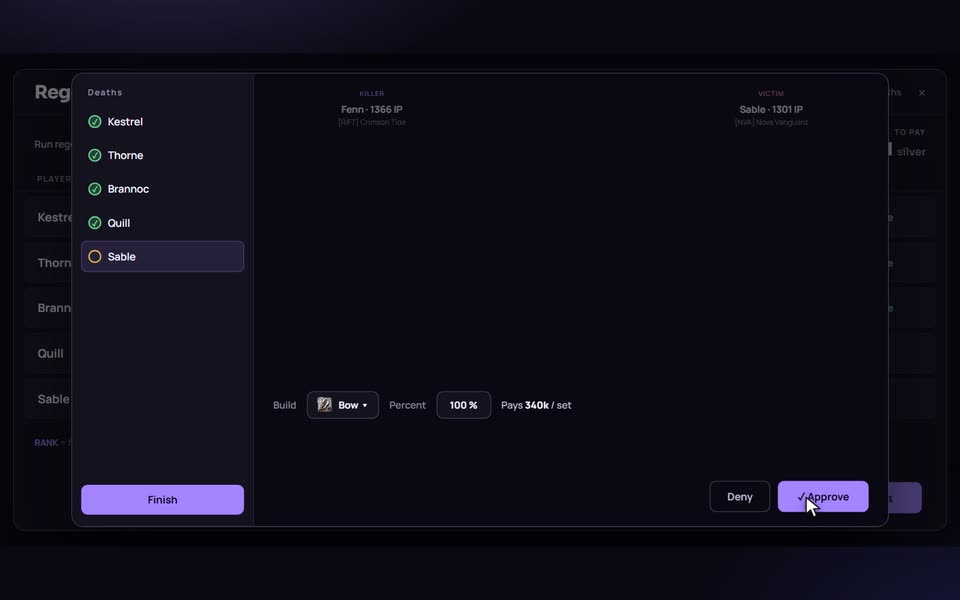
- Check attendance and set the player split. Mark absences, add fill-ins, and give anyone a different share or a flat extra.
- Review the summary. It shows the net pool, regears, extras and what each player receives.
- Press Execute payout. Each balance goes up by that player's share and the event moves to Paid out.
You can work through the stations in any order from the finished event's board, or step through the older payout wizard from the events list (Loot split, Regear, Individual extras, Player payout). Both read and write the same draft, so you can start in one and finish in the other. Nothing to pay out? Mark paid out closes the event without moving any silver.
Regears, extras and shares
Once the pool is set, three things shape what each player gets.
- Regears. With Fund from loot split on, regear silver comes out of the pool before shares are calculated. Max loot split for regear caps how much of the pool regears may take, and if the total goes over, every regear is scaled down by the same percentage. With it off, regears are paid from the guild bank on top and the whole pool is still split.
- Extras. A fixed bonus for a specific player, such as the caller or a scout. Extras come off the pool before the split.
- Share %. In Player split everyone starts at 100. The pool is divided by weight, not by headcount: nine players at 100 and one at 50 total 950, so the half-share player gets half of what the others get, and the other nine get a little more than an even ten-way split would give.
Continuing the example: the net pool is 73.8m, regears take 6m and extras take 1.8m, which leaves 66m. Split evenly between 33 players that is 2m each. The numbers are made up, but the order of operations is the one the site uses.
Rounding never loses silver. Leftovers are handed out one by one, so what is paid always adds up to the pool exactly.
Prefer to type every amount yourself? Pick Fixed per player instead of Split evenly in the wizard. The total cannot go over the pool.
Who gets paid
Only players the site can pay: a linked account, or a Discord-only balance for someone who signed up through Discord without an account. Their silver waits until they claim it. Guests are not paid, and anyone marked Absent on the attendance step is left out. A warning appears for people who are no longer in the guild.
The payouts page
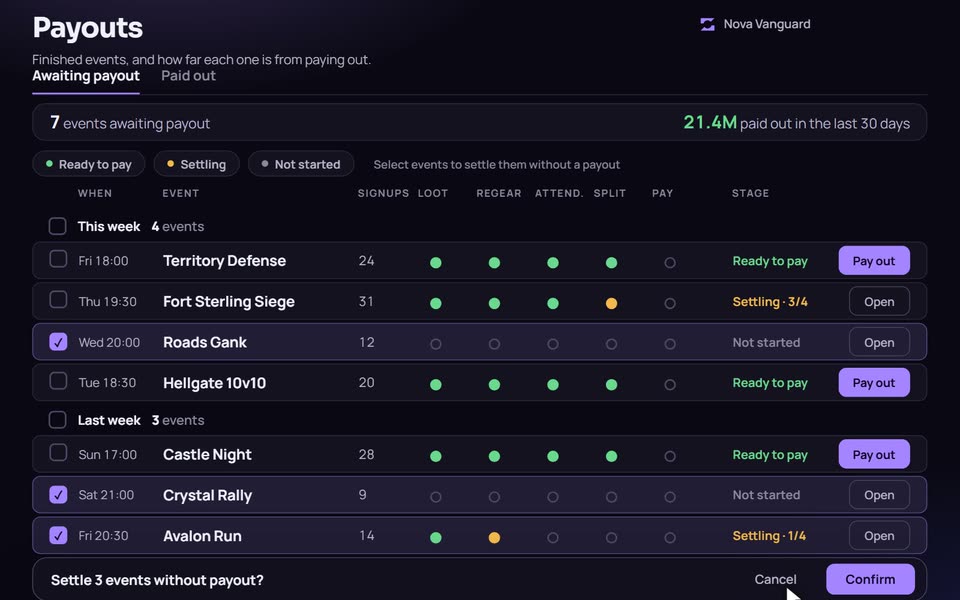
The payouts page is the officers' to-do list. Finished events wait under Awaiting payout until they are paid or settled. Each row shows how far it is: Not started, Settling (how many of four stations are done), or Ready to pay. Events are grouped by week, with weeks starting on Monday in UTC, and filtered by stage or by Mine and Whole guild.
If you have a backlog from before you started using payouts, select events and choose Settle without payout. No silver moves and they land in Paid out as Closed.
Members see their own side of the same page: the events they signed up for, what is still waiting, and what each paid out.
Balances and Discord
Every member has a silver balance in the guild. Positive means the guild owes them, negative means they owe the guild. Officers can grant, remove and pay out balances from Guild bank, which also has a log of every change and Bank Stats that sums up loot gained, paid to members and guild income. Members can check and pay from the website or from Discord with /balance, /pay and /bank. Officers can export the payout table as text for a Discord post, or the whole bank as a CSV.
Compared with spreadsheets and calculators
A stand-alone loot split calculator is quick for a one-off number and needs no sign-in. A spreadsheet is flexible. Both stop at the number: nothing is paid, nobody sees their balance, and the record lives in whatever file someone saved.
AlbionZVZ stores the result. The split, the regears, the attendance and the ledger are connected, every payout is logged and can be reverted, and members can see where their silver came from. The trade-off is that it is built for guilds running events through the site, not for a one-off calculation between friends.
Who it is for
Guild leaders and officers who settle loot after every ZvZ or CTA and want one record of what was earned, what was paid and what each member is owed.
Frequently asked questions
Is there a free loot split calculator I can use without a guild?
Not as a separate page. The calculator is the Lootsplit step on a finished guild event, and you need a guild to use it. The formula is on this page, so you can also work the numbers by hand.
Does the site pay out silver in game?
No. The site keeps the books. A payout adds each person's share to their balance, and an officer later trades the silver in game and clicks Pay out, which sets that balance back to zero.
Can I give one player a bigger or smaller share?
Yes. In Player split, everyone starts on a 100% share. Set 50 for half a share or 150 for a bonus share. The pool is divided by weight, so the total paid out never changes. Share weights never reduce a player's regear.
Who gets paid?
Signed-up players with a linked account, or with a Discord-only balance if they signed up through Discord without an account. Guests are not paid. Players marked Absent on the attendance step are left out.
Can I take guild tax?
Yes, two ways. Guild Tax is a percentage of the loot that is left after repairs. Guild Tax Raw Silver is a flat amount taken off first. The guild's total take shows up as Guild income in Bank Stats.
What if I make a mistake?
Open Paid out on the payouts page and click Revert on the event. Every balance goes back and you can run the payout again. A revert can be blocked if members have already spent their share, or if balances were wiped after the payout.
Can members see what they were paid?
Yes. Members see their own amount on the payouts page and in their balance activity. Leaders can also turn on payout receipt DMs, which tell each paid player their share, regear and new balance, and never show what the guild kept.